
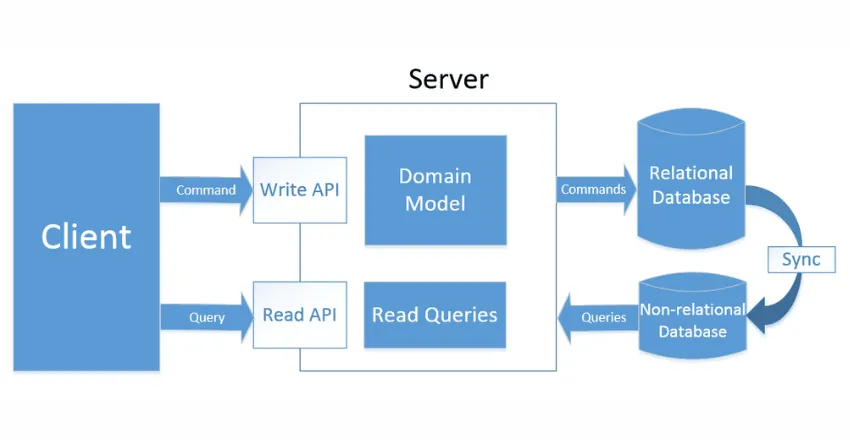
What is CQRS?
CQRS (Command Query Responsibility Segregation) is a design pattern that separates read operations (Queries) from write operations (Commands) into different models. Instead of using one model for both reading and writing data, CQRS divides your application into two distinct parts.
Core Principle:
- **Commands**: Change the state of the application (Create, Update, Delete)
- **Queries**: Retrieve data without modifying it (Read operations)
Think of it like a restaurant:
- **Command side** = Kitchen (prepares orders, changes inventory)
- **Query side** = Menu display (shows what's available, doesn't change anything)
Why Do We Need CQRS?
Problems with Traditional Architecture
In traditional applications, we use the same model for both reading and writing:
    // Traditional approach - same model for everything
    public class ProductService
    {
        public void CreateProduct(Product product)
        {
            // Write operation
            _dbContext.Products.Add(product);
            _dbContext.SaveChanges();
        }

        public Product GetProduct(int id)
        {
            // Read operation - same model
            return _dbContext.Products
                .Include(p => p.Category)
                .Include(p => p.Reviews)
                .FirstOrDefault(p => p.Id == id);
        }
    }
Problems:
1. Performance issues - Complex joins slow down reads
2. Scalability challenges - Can't scale reads and writes separately
3. Lock contention - Multiple operations on same data cause conflicts
4. Complex queries - One model trying to serve all purposes becomes complicated
CQRS Architecture
Basic Architecture
    ┌─────────────┐
    │   Client    │
    └──────┬──────┘
        │
        ├─────────► Commands (Write)
        │           ├─ CreateOrder
        │           ├─ UpdateProduct
        │           └─ DeleteUser
        │
        └─────────► Queries (Read)
                    ├─ GetOrderById
                    ├─ SearchProducts
                    └─ GetUserProfile
Two Main Approaches
1. Logical Separation (Same Database)
    ┌──────────────────────────────────┐
    │        Single Database           │
    │  ┌────────────┐  ┌────────────┐ │
    │  │  Commands  │  │  Queries   │ │
    │  │   Logic    │  │   Logic    │ │
    │  └────────────┘  └────────────┘ │
    └──────────────────────────────────┘
2. Physical Separation (Different Databases)
    ┌─────────────┐                 ┌─────────────┐
    │  Command    │    Events       │    Query    │
    │  Database   │ ───────────────►│  Database   │
    │  (Write)    │                 │   (Read)    │
    └─────────────┘                 └─────────────┘
Real-World Example: E-Commerce Order System
Let's build a complete example using C# and MediatR.
Step 1: Install Required Packages
    dotnet add package MediatR
    dotnet add package MediatR.Extensions.Microsoft.DependencyInjection
Step 2: Define Commands
Commands represent actions that change the state.
    using MediatR;

    // Command to create an order
    public class CreateOrderCommand : IRequest<CreateOrderResult>
    {
        public string CustomerId { get; set; }
        public List<OrderItem> Items { get; set; }
        public string ShippingAddress { get; set; }
    }

    public class OrderItem
    {
        public int ProductId { get; set; }
        public int Quantity { get; set; }
        public decimal Price { get; set; }
    }

    public class CreateOrderResult
    {
        public bool Success { get; set; }
        public int OrderId { get; set; }
        public string Message { get; set; }
    }
Step 3: Create Command Handler
The handler contains the business logic for the command.
    public class CreateOrderCommandHandler
        : IRequestHandler<CreateOrderCommand, CreateOrderResult>
    {
        private readonly IOrderRepository _orderRepository;
        private readonly IInventoryService _inventoryService;
        private readonly IEventPublisher _eventPublisher;

        public CreateOrderCommandHandler(
            IOrderRepository orderRepository,
            IInventoryService inventoryService,
            IEventPublisher eventPublisher)
        {
            _orderRepository = orderRepository;
            _inventoryService = inventoryService;
            _eventPublisher = eventPublisher;
        }

        public async Task<CreateOrderResult> Handle(
            CreateOrderCommand request,
            CancellationToken cancellationToken)
        {
            try
            {
                // 1. Validate inventory
                foreach (var item in request.Items)
                {
                    var available = await _inventoryService
                        .CheckAvailability(item.ProductId, item.Quantity);

                    if (!available)
                    {
                        return new CreateOrderResult
                        {
                            Success = false,
                            Message = $"Product {item.ProductId} is out of stock"
                        };
                    }
                }

                // 2. Calculate total
                var total = request.Items.Sum(i => i.Price * i.Quantity);

                // 3. Create order entity
                var order = new Order
                {
                    CustomerId = request.CustomerId,
                    OrderDate = DateTime.UtcNow,
                    TotalAmount = total,
                    ShippingAddress = request.ShippingAddress,
                    Status = OrderStatus.Pending,
                    Items = request.Items
                };

                // 4. Save to database
                await _orderRepository.CreateAsync(order);

                // 5. Publish event for query side to update
                await _eventPublisher.PublishAsync(new OrderCreatedEvent
                {
                    OrderId = order.Id,
                    CustomerId = order.CustomerId,
                    TotalAmount = order.TotalAmount,
                    CreatedAt = order.OrderDate
                });

                return new CreateOrderResult
                {
                    Success = true,
                    OrderId = order.Id,
                    Message = "Order created successfully"
                };
            }
            catch (Exception ex)
            {
                // Log error
                return new CreateOrderResult
                {
                    Success = false,
                    Message = $"Error creating order: {ex.Message}"
                };
            }
        }
    }
Step 4: Define Queries
Queries retrieve data without changing anything.
    // Query to get order details
    public class GetOrderByIdQuery : IRequest<OrderDetailsDto>
    {
        public int OrderId { get; set; }
    }

    // DTO for query result - optimized for display
    public class OrderDetailsDto
    {
        public int OrderId { get; set; }
        public string CustomerName { get; set; }
        public string CustomerEmail { get; set; }
        public DateTime OrderDate { get; set; }
        public string Status { get; set; }
        public decimal TotalAmount { get; set; }
        public string ShippingAddress { get; set; }
        public List<OrderItemDto> Items { get; set; }
    }

    public class OrderItemDto
    {
        public string ProductName { get; set; }
        public int Quantity { get; set; }
        public decimal Price { get; set; }
        public decimal Subtotal { get; set; }
    }
Step 5: Create Query Handler
Query handlers fetch data efficiently without business logic.
    public class GetOrderByIdQueryHandler
        : IRequestHandler<GetOrderByIdQuery, OrderDetailsDto>
    {
        private readonly IReadOnlyDbContext _readDbContext;
        // Or use Dapper for raw SQL queries

        public GetOrderByIdQueryHandler(IReadOnlyDbContext readDbContext)
        {
            _readDbContext = readDbContext;
        }

        public async Task<OrderDetailsDto> Handle(
            GetOrderByIdQuery request,
            CancellationToken cancellationToken)
        {
            // Direct SQL query for better performance
            var query = @"
                SELECT
                    o.OrderId,
                    o.OrderDate,
                    o.Status,
                    o.TotalAmount,
                    o.ShippingAddress,
                    c.Name as CustomerName,
                    c.Email as CustomerEmail,
                    oi.ProductName,
                    oi.Quantity,
                    oi.Price,
                    (oi.Quantity * oi.Price) as Subtotal
                FROM Orders o
                INNER JOIN Customers c ON o.CustomerId = c.CustomerId
                INNER JOIN OrderItems oi ON o.OrderId = oi.OrderId
                WHERE o.OrderId = @OrderId";

            // Using Dapper for efficient data retrieval
            using var connection = _readDbContext.CreateConnection();

            var orderDictionary = new Dictionary<int, OrderDetailsDto>();

            var result = await connection.QueryAsync<OrderDetailsDto, OrderItemDto, OrderDetailsDto>(
                query,
                (order, item) =>
                {
                    if (!orderDictionary.TryGetValue(order.OrderId, out var orderEntry))
                    {
                        orderEntry = order;
                        orderEntry.Items = new List<OrderItemDto>();
                        orderDictionary.Add(order.OrderId, orderEntry);
                    }

                    orderEntry.Items.Add(item);
                    return orderEntry;
                },
                new { OrderId = request.OrderId },
                splitOn: "ProductName"
            );

            return orderDictionary.Values.FirstOrDefault();
        }
    }
Step 6: Setup in API Controller
    [ApiController]
    [Route("api/[controller]")]
    public class OrdersController : ControllerBase
    {
        private readonly IMediator _mediator;

        public OrdersController(IMediator mediator)
        {
            _mediator = mediator;
        }

        // Command endpoint - Write operation
        [HttpPost]
        public async Task<IActionResult> CreateOrder(
            [FromBody] CreateOrderCommand command)
        {
            var result = await _mediator.Send(command);

            if (result.Success)
            {
                return Ok(result);
            }

            return BadRequest(result.Message);
        }

        // Query endpoint - Read operation
        [HttpGet("{id}")]
        public async Task<IActionResult> GetOrder(int id)
        {
            var query = new GetOrderByIdQuery { OrderId = id };
            var result = await _mediator.Send(query);

            if (result == null)
            {
                return NotFound();
            }

            return Ok(result);
        }
    }
Step 7: Configure Services
    public class Startup
    {
        public void ConfigureServices(IServiceCollection services)
        {
            // Add MediatR
            services.AddMediatR(cfg =>
                cfg.RegisterServicesFromAssembly(typeof(Startup).Assembly));

            // Add repositories
            services.AddScoped<IOrderRepository, OrderRepository>();

            // Add database contexts
            services.AddDbContext<WriteDbContext>(options =>
                options.UseSqlServer(Configuration.GetConnectionString("WriteDb")));

            services.AddDbContext<ReadDbContext>(options =>
                options.UseSqlServer(Configuration.GetConnectionString("ReadDb")));

            // Add other services
            services.AddScoped<IInventoryService, InventoryService>();
            services.AddScoped<IEventPublisher, EventPublisher>();
        }
    }
Synchronizing Read and Write Models
Using Event-Driven Communication
    // Event definition
    public class OrderCreatedEvent
    {
        public int OrderId { get; set; }
        public string CustomerId { get; set; }
        public decimal TotalAmount { get; set; }
        public DateTime CreatedAt { get; set; }
    }

    // Event handler to update read model
    public class OrderCreatedEventHandler : INotificationHandler<OrderCreatedEvent>
    {
        private readonly IReadModelRepository _readModelRepository;

        public OrderCreatedEventHandler(IReadModelRepository readModelRepository)
        {
            _readModelRepository = readModelRepository;
        }

        public async Task Handle(
            OrderCreatedEvent notification,
            CancellationToken cancellationToken)
        {
            // Update the read model (denormalized view)
            var orderView = new OrderReadModel
            {
                OrderId = notification.OrderId,
                CustomerId = notification.CustomerId,
                TotalAmount = notification.TotalAmount,
                CreatedAt = notification.CreatedAt,
                LastUpdated = DateTime.UtcNow
            };

            await _readModelRepository.UpsertAsync(orderView);
        }
    }
Real-World Use Cases
1. E-Commerce Platform
Command Side:
- Process orders
- Update inventory
- Handle payments
Query Side:
- Display product catalogs
- Show order history
- Generate reports
2. Banking System
Command Side:
- Transfer money
- Create accounts
- Process transactions
Query Side:
- View account balance
- Display transaction history
- Generate statements
3. Social Media Platform
Command Side:
- Create posts
- Add comments
- Like/share content
Query Side:
- Display news feed
- Search posts
- Show user profiles
Best Practices
✅ Do's
1. Keep Commands Simple
    // Good - Clear intent
    public class ActivateUserCommand : IRequest<bool>
    {
        public int UserId { get; set; }
    }

    // Avoid - Too generic
    public class UpdateUserCommand : IRequest<bool>
    {
        public int UserId { get; set; }
        public Dictionary<string, object> Changes { get; set; }
    }
2. Optimize Query Models
    // Good - Denormalized for fast reads
    public class ProductListDto
    {
        public int Id { get; set; }
        public string Name { get; set; }
        public decimal Price { get; set; }
        public string CategoryName { get; set; } // Denormalized
        public int ReviewCount { get; set; } // Pre-calculated
        public double AverageRating { get; set; } // Pre-calculated
    }
3. Use Async Communication
    // Good - Non-blocking
    public async Task<Result> Handle(
        UpdateInventoryCommand request,
        CancellationToken cancellationToken)
    {
        await _repository.UpdateAsync(request);

        // Publish event asynchronously
        await _eventBus.PublishAsync(new InventoryUpdatedEvent
        {
            ProductId = request.ProductId,
            NewQuantity = request.Quantity
        });

        return Result.Success();
    }
❌ Don'ts
1. Don't Mix Responsibilities
    // Bad - Query shouldn't modify data
    public class GetUserQuery : IRequest<UserDto>
    {
        public int UserId { get; set; }
        public bool UpdateLastAccess { get; set; } // Wrong!
    }
2. Don't Over-Normalize Read Models
    // Bad - Too many joins needed
    public class OrderDto
    {
        public int OrderId { get; set; }
        public int CustomerId { get; set; } // Requires join
        public int ProductId { get; set; } // Requires join
        // Should include denormalized data instead
    }
3. Don't Use CQRS for Simple CRUD
    // Overkill for simple operations
    public class GetUserByIdQuery : IRequest<User>
    {
        public int Id { get; set; }
    }

    // Just use:
    var user = await _dbContext.Users.FindAsync(id);
When to Use CQRS
✅ Good Fit
1. Complex Domain Logic
- Multiple business rules
- Different validation for reads and writes
2. High Read/Write Ratio
- Many more reads than writes
- Need to scale independently
3. Performance Critical
- Need optimized queries
- Different scaling requirements
4. Collaborative Systems
- Multiple users working on same data
- Need to prevent conflicts
❌ Not Suitable
1. Simple CRUD Applications
- Basic create/read/update/delete
- No complex business logic
2. Low Traffic Applications
- Small user base
- No scaling needs
3. Strict Consistency Requirements
- Banking transactions (some scenarios)
- Real-time critical systems
Common Pitfalls and Solutions
Pitfall 1: Eventual Consistency Issues
Problem:
    // User creates order
    await _mediator.Send(new CreateOrderCommand { ... });

    // Immediately try to read it - might not be there yet!
    var order = await _mediator.Send(new GetOrderByIdQuery { OrderId = newId });
    // order might be null due to replication lag
Solution:
    // Return the created data directly from command
    public class CreateOrderResult
    {
        public bool Success { get; set; }
        public int OrderId { get; set; }
        public OrderDetailsDto Order { get; set; } // Include full details
    }

    // Or use correlation IDs to track sync status
    public class CreateOrderCommand : IRequest<CreateOrderResult>
    {
        public Guid CorrelationId { get; set; } = Guid.NewGuid();
    }
Pitfall 2: Over-Engineering
Problem: Using CQRS for everything, even simple operations.
Solution: Use CQRS only where it adds value:
    // Simple operations - skip CQRS
    public class UserService
    {
        public async Task<User> GetByIdAsync(int id)
        {
            return await _context.Users.FindAsync(id);
        }
    }

    // Complex operations - use CQRS
    public class GetUserDashboardQuery : IRequest<DashboardDto>
    {
        public int UserId { get; set; }
    }
Pitfall 3: Neglecting Error Handling
Problem: Not handling synchronization failures.
Solution:
    public class OrderCreatedEventHandler : INotificationHandler<OrderCreatedEvent>
    {
        private readonly ILogger<OrderCreatedEventHandler> _logger;
        private readonly IReadModelRepository _repository;

        public async Task Handle(OrderCreatedEvent notification, CancellationToken ct)
        {
            try
            {
                await _repository.UpsertAsync(notification);
            }
            catch (Exception ex)
            {
                _logger.LogError(ex, "Failed to update read model for order {OrderId}",
                    notification.OrderId);

                // Implement retry logic or dead letter queue
                throw; // Re-throw to trigger retry mechanism
            }
        }
    }
Benefits and Challenges
Benefits
✅ Independent Scaling - Scale reads and writes separately
✅ Optimized Performance - Different models for different needs
✅ Clear Separation - Easier to understand and maintain
✅ Flexible Data Models - Use best database for each side
✅ Better Security - Control access to write operations
Challenges
❌ Increased Complexity - More code and infrastructure
❌ Eventual Consistency - Data may be temporarily out of sync
❌ Learning Curve - Team needs to understand the pattern
❌ More Infrastructure - May need message queues, multiple databases
Summary
CQRS is a powerful pattern for building scalable, high-performance applications. Key takeaways:
1. Separate reads from writes for better optimization
2. Use commands for state changes with business logic
3. Use queries for data retrieval without side effects
4. Apply selectively - not every application needs CQRS
5. Handle eventual consistency with proper UI/UX design
6. Start simple with logical separation before physical separation
Remember: CQRS is a tool, not a silver bullet. Use it when the benefits outweigh the added complexity.
Additional Resources
- Microsoft Docs: CQRS Pattern
- Greg Young: CQRS Documents
- Martin Fowler: CQRS Pattern
- MediatR Documentation