
In the modern web world SPA, microservices, mobile, cloud you often hear: “Use JWT, it's convenient!”
But what exactly is JWT? How does it work? Why is it so popular?
This post will help you understand JWT from A → Z in the simplest way!
1. What is JWT?
==================
JWT (JSON Web Token) is a long string of characters used to authenticate users between the client and server.
Imagine JWT as a kind of “identity card”:
- The server issues the card after you successfully log in.
- The card contains information that proves who you are.
- Whenever you call a service, just present the card.
Key point:
JWT does NOT need to be stored on the server. The token itself contains all the necessary authentication information.
Example of a typical JWT:
eyJhbGciOiJIUzI1NiIsInR5cCI6IkpXVCJ9
.eyJ1c2VySWQiOiIxMjMiLCJyb2xlIjoiYWRtaW4ifQ
.XlAaCByK8P5X3eK0XJ_kHzdYVxVdzH-LA4Q4zS9xk3k
It looks intimidating, but JWT is simply 3 parts joined together by dots.
2. How do JWT's Three Main Parts Work?
======================================
A JWT always looks like:
Header.Payload.Signature
1. Header
Contains information about how to decode the token (the signing algorithm):
{
  "alg": "HS256",
  "typ": "JWT"
}- `alg`: signing algorithm (e.g., HS256, RS256)
- `typ`: token type (always JWT)
2. Payload
Contains the data the server wants to send to the client, for example:
{
  "userId": 123,
  "role": "admin",
  "exp": 1712345678
}
Three common types of info:
- Standard Claims:
- `exp`: expiration time
- `iat`: time of creation
- `sub`: subject (who the token belongs to)
- Custom Claims:
- `userId`, `role`, `email`, `permissions`...
- Note: Payload is NOT encrypted; anyone can read it, but NO ONE can modify it thanks to the signature.
3. Signature
Makes sure NO ONE can tamper with the token.
How signature is created:
signature = HMACSHA256(
    base64(header) + "." + base64(payload),
    secret_key
)
If anyone edits the payload, the signature won't match, and the token becomes invalid.
3. How Does JWT Work? (Basic Flow)
==================================
Step 1: User logs in (sends username/password to server).
Step 2: Server verifies and returns a JWT, containing details like userId, role, exp.
Step 3: Client stores the JWT (in localStorage, sessionStorage or cookie).
Step 4: Client sends JWT with every API request:
Authorization: Bearer <jwt-token>Step 5: Server verifies token:
- Decodes, checks the signature, gets user info.
- If valid → sends back the requested data.
- If invalid or expired → returns 401 Unauthorized.
Advantage: NO need to query the database every time → much faster.
4. Why is JWT So Popular?
=========================
- Stateless – No session stored on the server → less memory used, suitable for microservices & cloud.
- High speed – Server just checks signature, no repeated DB lookups.
- Can transfer between services – Any API Gateway or microservice recognizes JWT.
- Open standard, multi-language – Supported by Java, Node.js, Python, Go, .Net, PHP, etc.
- Ideal for SPA / mobile apps – React, Angular, Vue, iOS, Android.
5. Comparison: JWT, Session Cookie, OAuth2 Token
===============================================
| Criteria | JWT | Session Cookie | OAuth2 Token |
|--------------------|-----------------|------------------|---------------|
| Server storage | No | Yes | No |
| Best fit | SPA, Mobile, Micro | Traditional Web| Large system, SSO |
| Easy to scale | Yes | No | Yes |
| Instant logout | Difficult | Yes | Supported |
| CSRF security | Good (header) | Risk (cookie) | Good |
| Self-contained info| Yes | No | Yes |
| How to verify | Signature check | Session in DB | Signature check|
| Complexity | Medium | Easy | High |
When to Use Which?
------------------
- Session Cookie:
- Traditional web (Laravel, Rails, Spring MVC)
- Want instant logout
- JWT:
- SPA (React/Angular/Vue), Mobile App, Microservices, API Gateway, Serverless
- OAuth2/OIDC:
- Google/Facebook login, SSO, large enterprise, need scope-based permission control
Quick Summary
=============
| Technology | Main Strengths | When to Use |
|--------------------|--------------------------|------------------------|
| Session Cookie | Easy, secure, instant logout | Traditional web |
| JWT | Fast, stateless, scales well | SPA, API, mobile, microservices |
| OAuth2 Token | Standardized, SSO, enterprise | Google login, SSO, large systems |
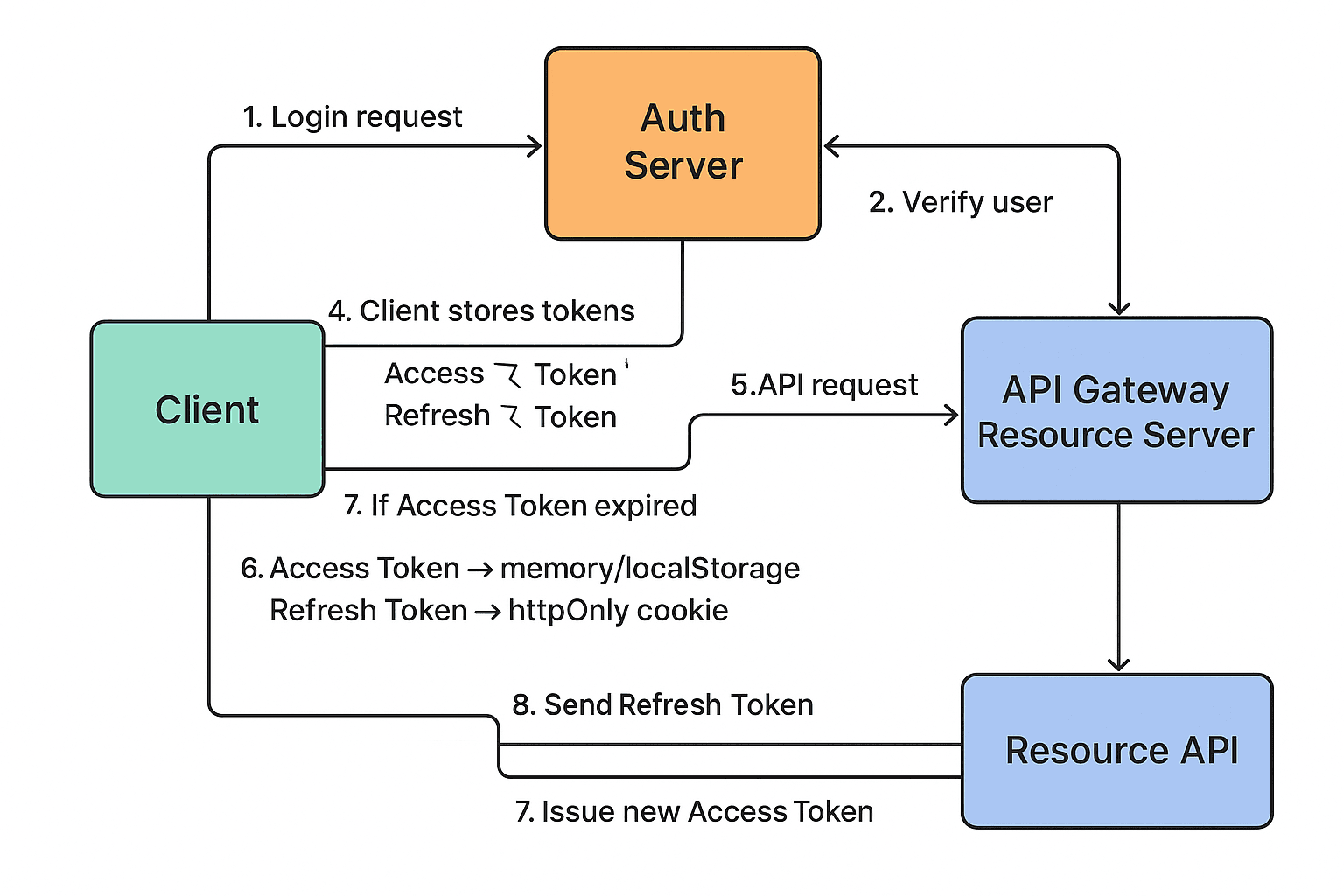
Standard JWT Flow (ASCII Diagram)
=================================
  +-------------+      1. Login             +-------------------+
  |   Client    | ----------------------->  |   Auth Server     |
  +-------------+  (username/password)      +-------------------+
                                                    |
                                                    | 2. Verify
                                                    v
                                            +-------------------+
                                            | Generate JWT      |
                                            | - Access Token    |
                                            | - Refresh Token   |
                                            +-------------------+
                                                    |
                    3. Send token(s)               |
  +-------------+ <-------------------------------+
  |   Client    |
  +-------------+
    | 4. Store token (localStorage, cookie)
    | 5. Call API with Access Token:
    |      Authorization: Bearer <AccessToken>
    |
    | 6. Server verifies Access Token:
    |    If valid -> returns data
    |    If expired or invalid -> use Refresh Token (cookie)
    v
  (Token renewal process as above)
Difference between Access Token & Refresh Token
=============================================
| Criteria | Access Token | Refresh Token |
|-----------------|--------------------|------------------------------|
| Purpose | API requests | Get new Access Token |
| Lifetime | Very short (5–15 mins) | Long (7–30 days, sometimes more) |
| Storage | localStorage/memory | httpOnly cookie (protect against XSS) |
| Sent with APIs | Authorization: Bearer| Only when renewing token |
| Security | Less secure (sent often) | More secure (httpOnly cookie)|
| Risk | If leaked → immediate use| If leaked → bigger risk (long-lived) |
| Use cases | EVERY API request | Only when Access Token expires|
| Session state | Stateless | May involve server-side (if rotation) |
Why Need Two Types of Token?
----------------------------
- Short-lived Access Token: If stolen, attacker only gets limited window to exploit.
- Refresh Token helps users avoid frequent login (better experience).
- Refresh Token can be better protected (httpOnly cookie + rotation).
Refresh Token Rotation Flow (Enterprise Standard)
================================================
1. Client sends Refresh Token.
2. Server responds:
- New Access Token
- New Refresh Token (previous token invalidated in DB)
3. If old Refresh Token is stolen, server will refuse its use.
Quick Answers
=============
| Question | Answer |
|-----------------------------|-------------------------------------|
| Why have both tokens? | Security & smooth user experience |
| Access Token for? | Authorize API requests |
| Refresh Token for? | Obtain new Access Token when expired|
| Access Token lifetime? | 5–15 minutes |
| Refresh Token lifetime? | 7–30 days |
| How to secure Refresh Token? | Use httpOnly cookie + HTTPS only |
Important Notes
===============
- Never store sensitive data in JWT payload (it's NOT encrypted!)
- Always set sensible expiry for tokens.
- Always use HTTPS.
- Store Refresh Token in httpOnly + Secure cookie to avoid XSS.
Hope this article helps you get the JWT basics down!